Every van. Every shift. Proof.
Drivers line up the outline and hold still: the phone takes each photo itself. AI compares it with yesterday, flags new damage and shows you who had the van. Defects, repairs, fuel and charging cables, all in one place.
No card needed · Set up your fleet in about 10 minutes · iPhone, Android and web
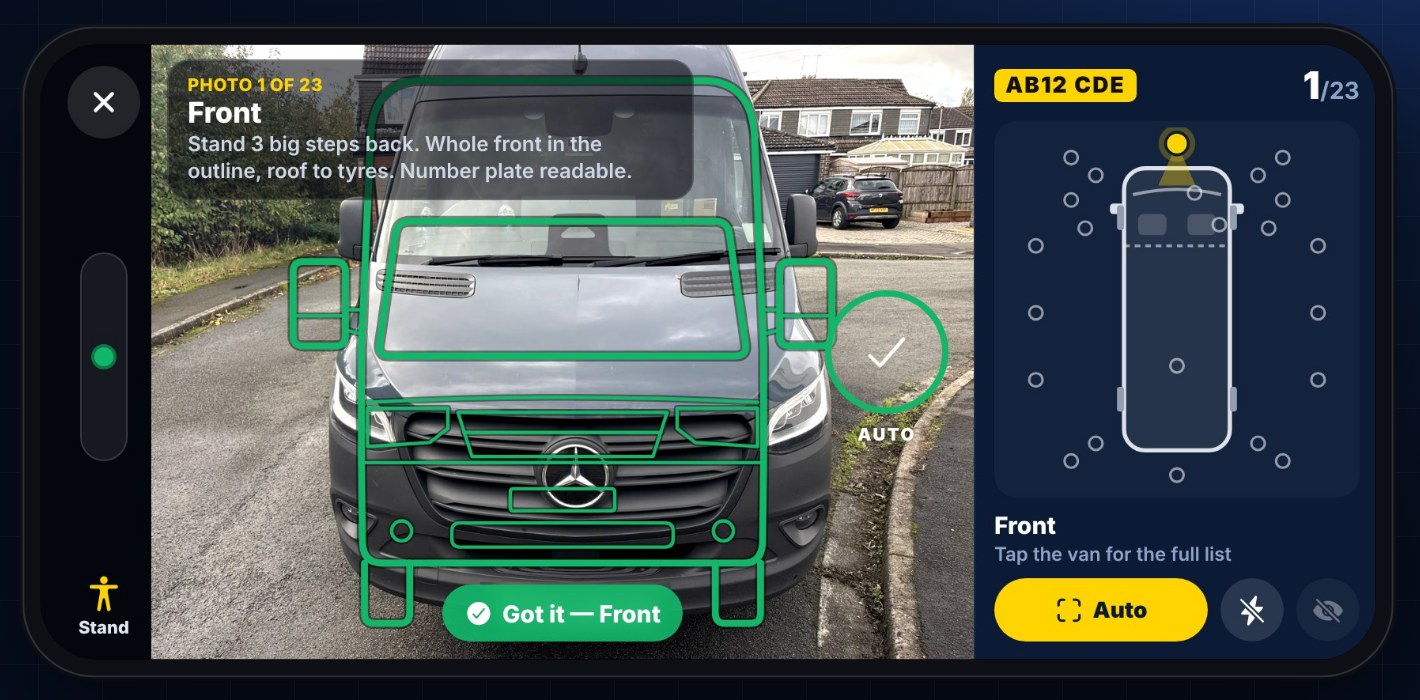
Scuff on the front right bumper. Not there on yesterday's check.
From the yard to the office, in one app
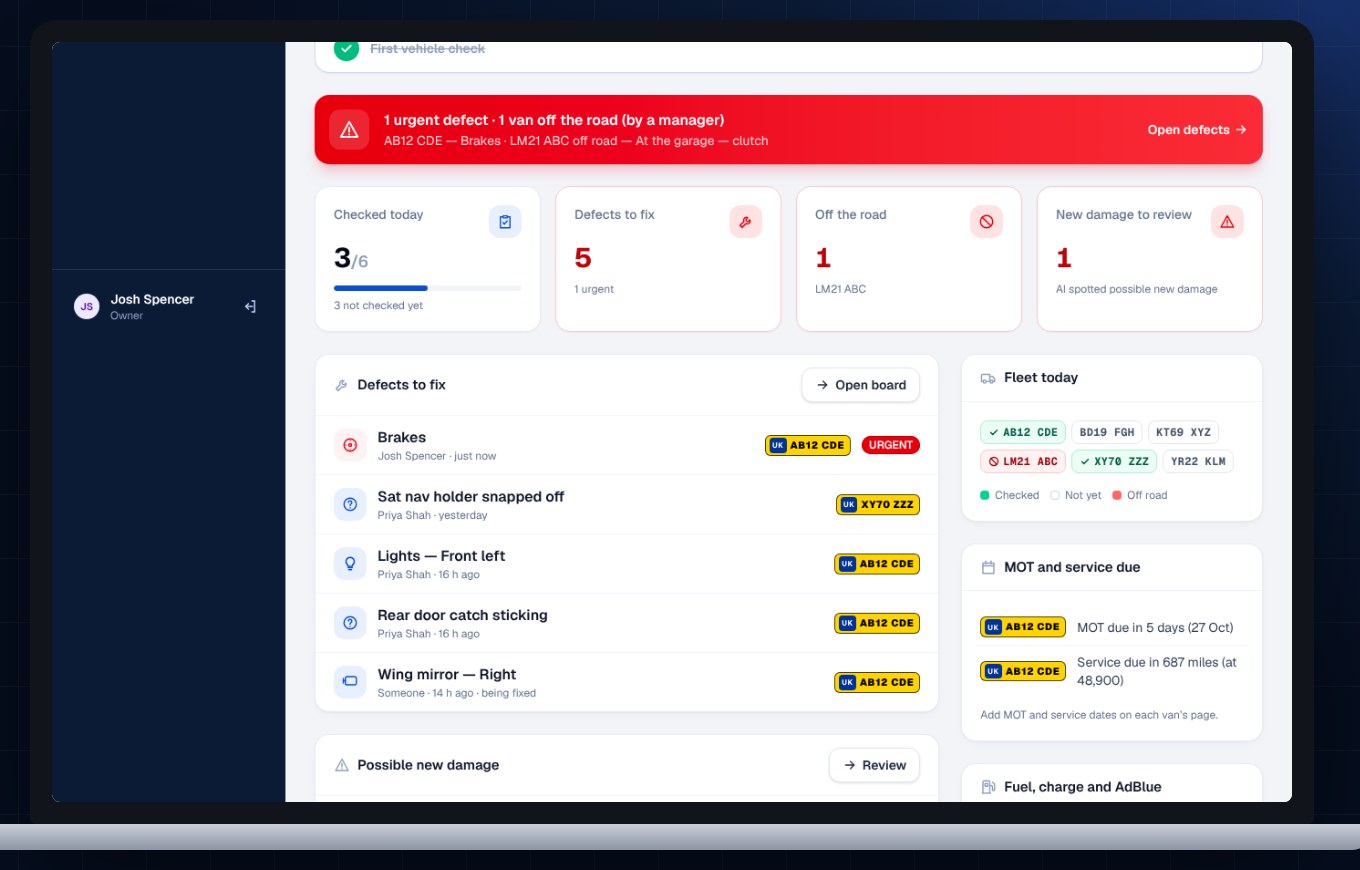
Real screens from the VanProof app and dashboard.
Damage you can't prove is damage you pay for
Undated photos and long WhatsApp threads don't hold up when a repair bill lands. Nobody knows who had the van, which defects were fixed, or where the charging cable went.
Photos with no proof
A photo with no date, location or handover record doesn't show when the damage happened, or who was driving.
Defects lost in group chats
Tyres, wipers and warning lights get reported in a chat, then buried. Mechanics can't see what's open or what's been fixed.
Missing charging cables
Electric vans come back unplugged and cables walk. Without a photo at the end of the shift, there's no way to know who left it.
In Hussain v Raina Ltd (2023), a Greater Manchester courier won back £1,188.51 in van-damage deductions because the firm couldn't show when the damage happened.
A full van check before the van leaves the yard
Scan the van
The driver scans the sticker in the cab or the number plate. VanProof knows which van it is and who's driving it today.
Line up, hold still
23 guided photos: the outside, a close-up of every corner, each side tyres to roof, the cab and the load area. The phone takes each photo itself when it's lined up, and the outline turns green. Then dash warnings, mileage, fuel or charge, AdBlue and a quick safety checklist.
AI checks every panel
Each photo is compared with the last check of the same van. Anything new is marked on the photo and sent to your dashboard, with the driver who had the van before.
Everything your fleet team chases, in one place
AI damage detection
Spots scratches, scuffs, dents and cracks, and only alerts you to what's new since the last check.
Defects board
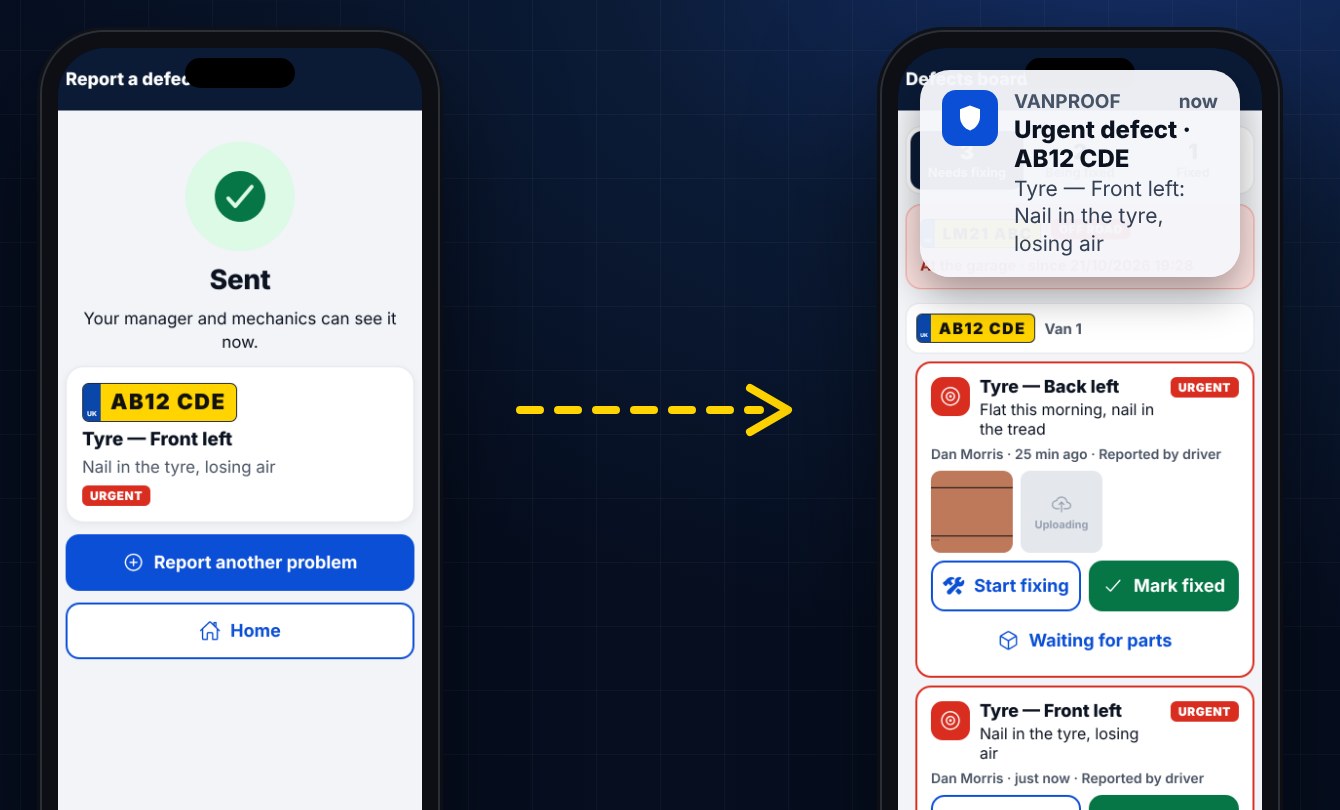
Replaces the defects group chat. Drivers report with photos, urgent ones go to the top, and nothing gets lost.
Repairs, parts and MOTs
Mechanics mark defects fixed with before and after photos, flag "waiting for parts", and get reminded when a MOT or service is due.
Fuel, charge and AdBlue
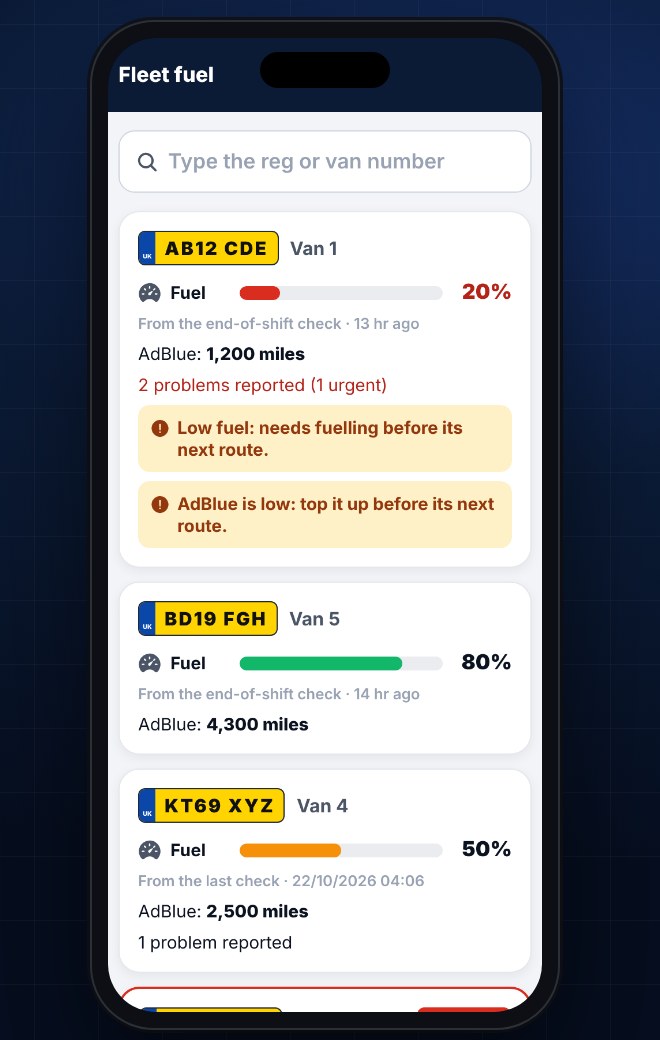
Low fuel or AdBlue prompts the driver to get the fuel card before the route. AI reads the dash to check what they typed.
Charging cable check
At the end of the shift drivers photograph the electric van plugged in. You can see which vans weren't, and who drove them.
The cab and the load area
One photo across the cab shows both seats, the seatbelts and the floor; another shows the load area. Torn seats, broken shelves and paint spills get caught.
Dash messages
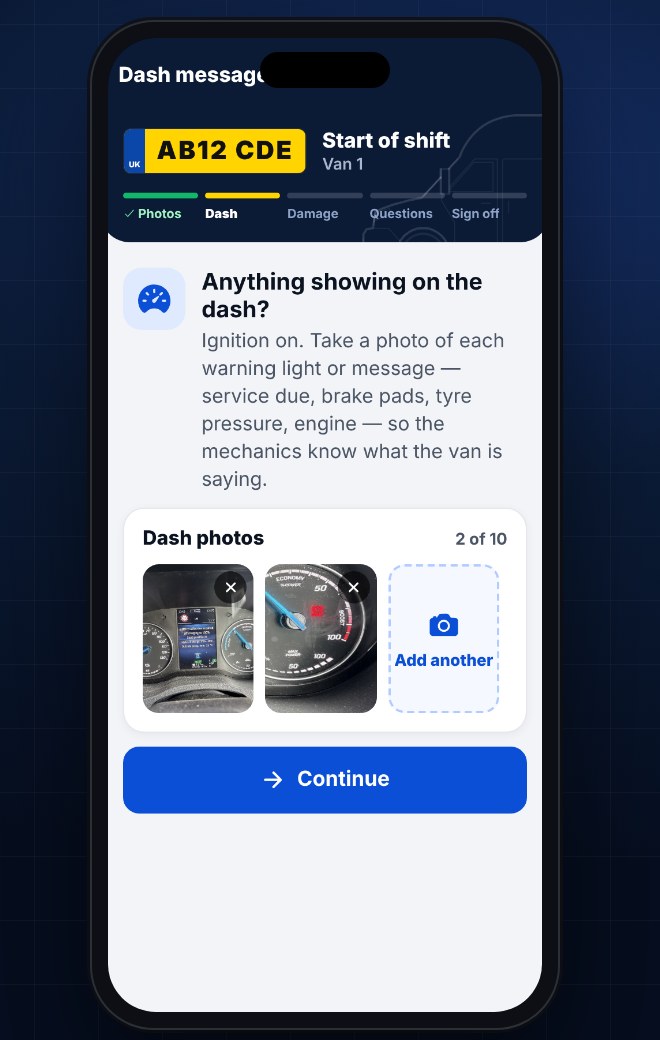
Service due, brake pads, tyre pressure: drivers photograph up to 10 warnings, and your mechanic sees exactly what the van is saying.
Never stuck
Checks save on the phone with no signal and upload later. If the app won't open, drivers can do the check in any web browser.
The right access for everyone
Drivers see their own checks. Mechanics see defects and repairs. Managers see the whole fleet, from the app or any browser.
Alerts on your phone
Managers and mechanics choose what they hear about: urgent defects, new damage, MOTs due. By phone notification, WhatsApp or email.
Fleet fuel board
Managers and mechanics see every van's fuel or charge and AdBlue from its last check, so the low ones are sorted before the drivers go out.
Ask VanProof
Managers and mechanics just ask: “What damage has AB12 CDE had this month?” or “Which vans haven’t been checked today?” The AI looks it up in seconds.
One app, three jobs
Prove the van was fine when they took it
A simple guided check on their phone. Their photos protect them from damage they didn't do.
See the whole fleet before routes go out
Who's checked in, which vans need fuel or AdBlue, new damage, urgent defects and vans off the road, on one screen.
A clear list of what needs fixing
Every open defect with photos and position. Fix it, snap the after photo, and it's logged.
Your fleet's data stays yours
Kept completely separate
Every company is walled off. Other delivery partners never see your vans, drivers or photos, even at the same depot.
Support access you can see
If we ever open your account to help, it's for a stated reason, ends after 2 hours, and shows up in your Settings.
Evidence that stands up
Every photo is time-stamped, located and fingerprinted on the phone, so you can show it hasn't been changed since.
UK GDPR
A UK company. We sign a data processing agreement with every customer and only use your data to run VanProof for you.
One simple price per van
Every feature included. Unlimited checks, drivers, managers and mechanics. Pay monthly and cancel any time.
- 14-day free trial, no card needed
- AI damage checks on every photo
- iPhone, Android and web
- UK support from people who've done the job
Questions
How long does a check take?
About five minutes. A map beside the camera shows drivers where to stand. They line up the outline and hold still, and the phone takes the photo and moves on by itself.
How do I set up my fleet?
Create your company, paste your van list straight from a spreadsheet, and share one invite link with your drivers. They join your company when they sign up.
What if there's no signal, or the app won't open?
Checks save on the phone and upload when the signal's back. If the app won't open, drivers can do the same check in any web browser, so you still have every van recorded that day.
Does it work for electric vans?
Yes. Drivers record the charge level, and at the end of the shift they photograph the van plugged in, so you know which vans will be charged in the morning.
Can VanProof staff see my data?
Only if you need help and we open your account to sort it. Each time is for a stated reason, ends after 2 hours and is listed in your Settings.
Do I have to sign a contract?
No. It's monthly, and you can cancel any time.
Who can see the photos?
Only people in your company. Drivers see their own checks, mechanics see defects and repairs, and managers see everything.
Try it on your fleet for 14 days
Set up in about 10 minutes. No card needed.